NAME
fs-spectre — 👻💻 Spectre.Console with F# style.
SYNOPSIS
INFO
DESCRIPTION
👻💻 Spectre.Console with F# style.
README
FsSpectre
Spectre.Console with F# style.
FsSpectre is a small library that extends Spectre.Console and allow to write beautiful console applications in a declarative and more F#-friendly way. It leverages Computation Expressions to create the widgets in a declarative style.
Add package
If you want to add this package to your project, execute the following command:
dotnet add package FsSpectre
Build on your machine
If you want to build this library on your machine, execute the following commands:
git clone git@github.com:galassie/fs-spectre.git
cd fs-spectre
dotnet build
Examples
Table
With C# + Spectre.Console:
var table = new Table();
table.AddColumn("Foo");
table.AddColumn(new TableColumn("Bar").Centered());
table.AddRow("Baz", "[green]Qux[/]");
table.AddRow(new Markup("[blue]Corgi[/]"), new Panel("Waldo"));
AnsiConsole.Write(table);
With F# + FsSpectre:
table {
    column_text ""
    column (tableColumn { header_text "Feature"; centerd })
    row_text [| "Baz"; "[green]Qux[/]" |]
    row [| markup { text "[blue]Corgi[/]" }; panel { content_text "Waldo" } |]
} |> AnsiConsole.Write
Bar Chart
With C# + Spectre.Console:
AnsiConsole.Write(new BarChart()
    .Width(60)
    .Label("[green bold underline]Number of fruits[/]")
    .CenterLabel()
    .AddItem("Apple", 12, Color.Yellow)
    .AddItem("Orange", 54, Color.Green)
    .AddItem("Banana", 33, Color.Red));
With F# + FsSpectre:
barChart {
    width 60
    label "[green bold underline]Number of fruits[/]"
    centered_label
    item ("Apple", 12, Color.Yellow)
    item ("Oranges", 54, Color.Green)
    item ("Bananas", 33, Color.Red)
} |> AnsiConsole.Write
Live Display
With C# + Spectre.Console:
var table = new Table().Centered();AnsiConsole.Live(table) .Start(ctx => { table.AddColumn("Foo"); ctx.Refresh(); Thread.Sleep(1000);
table.AddColumn("Bar"); ctx.Refresh(); Thread.Sleep(1000); });
With F# + FsSpectre:
let liveDisplayTable = table { centered }liveDisplay { target liveDisplayTable
start (fun ctx -> liveDisplayTable.AddColumn("Foo") |> ignore ctx.Refresh() Thread.Sleep(1000) liveDisplayTable.AddColumn("Bar") |> ignore ctx.Refresh() Thread.Sleep(1000))
}
and for the Async version:
let liveDisplayAsyncTable = table { title_text "Async Table" }liveDisplayAsync { target liveDisplayAsyncTable
start (fun ctx -> task { liveDisplayAsyncTable.AddColumn("Foo") |> ignore ctx.Refresh() do! Task.Delay(1000) liveDisplayAsyncTable.AddColumn("Bar") |> ignore ctx.Refresh() do! Task.Delay(1000) })
}
Progress
With C# + Spectre.Console:
AnsiConsole.Progress() .Start(ctx => { var task1 = ctx.AddTask("[green]Reticulating splines[/]"); var task2 = ctx.AddTask("[green]Folding space[/]");while(!ctx.IsFinished) { Thread.Sleep(250); task1.Increment(1.5); task2.Increment(0.5); } });
With F# + FsSpectre:
progress { start (fun ctx -> let task1 = ctx.AddTask("[green]Reticulating splines[/]") let task2 = ctx.AddTask("[green]Folding space[/]")while not ctx.IsFinished do Thread.Sleep(250) task1.Increment(1.5) task2.Increment(0.5))
}
and for the Async version:
progressAsync { start (fun ctx -> task{ let task1 = ctx.AddTask("[green]Reticulating splines[/]") let task2 = ctx.AddTask("[green]Folding space[/]")while not ctx.IsFinished do do! Task.Delay(250) task1.Increment(1.5) task2.Increment(0.5) })
}
Status
With C# + Spectre.Console:
AnsiConsole.Status() .Spinner(Spinner.Known.Arrow) .SpinnerStyle(Style.Parse("blue")) .Start("Thinking...", ctx => { AnsiConsole.MarkupLine("Doing some work..."); Thread.Sleep(1000);ctx.Status("Thinking some more"); ctx.Spinner(Spinner.Known.Star); ctx.SpinnerStyle(Style.Parse("green")); AnsiConsole.MarkupLine("Doing some more work..."); Thread.Sleep(2000); });
With F# + FsSpectre:
status { spinner Spinner.Known.Arrow spinner_style (Style.Parse("blue"))status "Thinking..." start (fun ctx -> AnsiConsole.MarkupLine("Doing some work...") Thread.Sleep(1000) ctx.Status <- "Thinking some more" ctx.Spinner <- Spinner.Known.Star ctx.SpinnerStyle <- Style.Parse("green") AnsiConsole.MarkupLine("Doing some more work...") Thread.Sleep(2000))
}
and for the Async version:
statusAsync { spinner Spinner.Known.Arrow spinner_style (Style.Parse("blue"))status "Thinking..." start (fun ctx -> task { AnsiConsole.MarkupLine("Doing some work...") do! Task.Delay(1000) ctx.Status <- "Thinking some more" ctx.Spinner <- Spinner.Known.Star ctx.SpinnerStyle <- Style.Parse("green") AnsiConsole.MarkupLine("Doing some more work...") do! Task.Delay(2000) })
}
Showcase
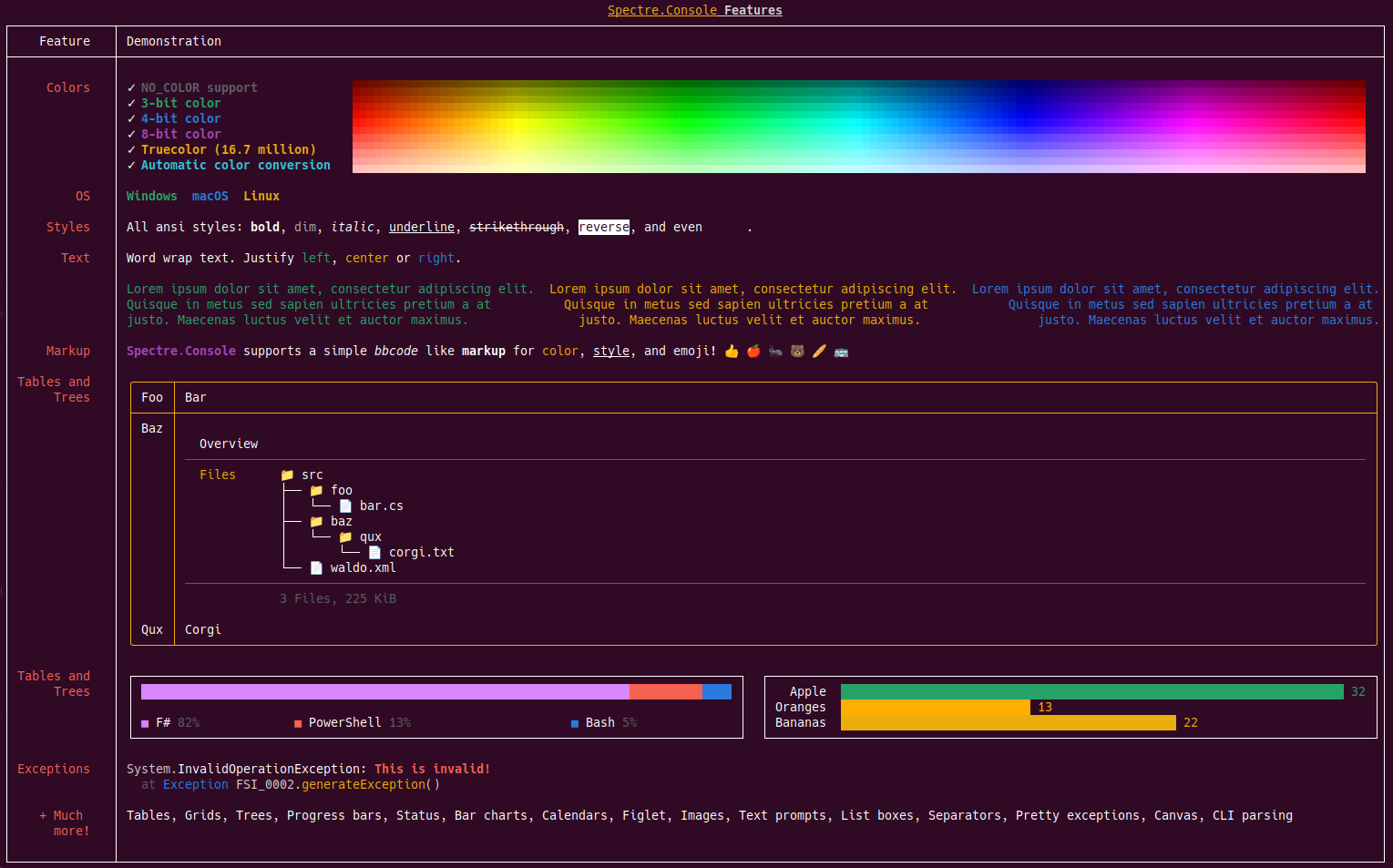
To see an example, execute the Showcase.fsx with the following command (you need to build the library first):
dotnet fsi Showcase.fsx
Alternatives
If you don't like this style of using Spectre.Console with Computation Expressions, check out these amazing projects:
Contributing
Code contributions are more than welcome! 😻
Please commit any pull requests against the main branch.
If you find any issue, please report it!
License
This project is licensed under The MIT License (MIT).
Author: Enrico Galassi