NAME
ghcitty — Fast, friendly GHCi
SYNOPSIS
cargo install ghcittyINFO
DESCRIPTION
Fast, friendly GHCi
README
 d4
d4

ghcitty
Fast, friendly GHCi
ghcitty is a tiny Rust binary that wraps GHCi with a snappy, delightful frontend

(demo) Tab completion, ghost hints, smart multiline
Features
- Syntax highlighting
- Structured errors with expected/actual diffs, auto-import hints, error code links
- Tab completion with inline types
- Fish-style ghost completions
- Pretty-printed
Showoutput (records, lists, tuples) - Hoogle integration
- Binding explorer
- Auto-detect stack/cabal projects
- Bracketed paste
- Auto-saved, resumable sessions
- JSON mode for tooling
- Auto-reload on file changes
- Vi mode
Of note
At the end of the day, ghcitty is just a modest GHCi frontend w/ a tiny memory footprint to give some niceties to an already formidable, fun and proven REPL.
Install
Prerequisites
You just need a GHC and Rust installed
Cargo

cargo install ghcitty
And use with:
ghcitty
From source
git clone https://github.com/mattlianje/ghcitty.git
cd ghcitty
cargo install --path .
Nix
nix profile install github:mattlianje/ghcitty
Cabal / Stack
Run ghcitty from a directory with any of
stack.yml
cabal.project
*.cabal
and it launches via stack ghci or cabal repl (the startup banner shows which)
Pass --plain to force bare ghci
Anything after -- is forwarded verbatim to the underlying invocation uv-style...
ghcitty -- --flag mypkg:dev              # stack ghci --flag mypkg:dev
ghcitty -- lib:mylib -O0                 # cabal repl lib:mylib -O0
ghcitty --plain -- -package text         # ghci -package text
Usage
ghcitty                           Interactive REPL
ghcitty eval "map (+1) [1,2,3]"   One-shot eval
ghcitty --json eval "1 + 1"       JSON output
ghcitty --session work            Named session
ghcitty --continue                Restore last session
Tour
Auto-multiline with navigation
Multiline is auto-detected. Up/Down to move between lines, blank line to submit.
:{ :} blocks also work as per the usual, with in-buffer navigation.

Hoogle
:hoogle to search by name or type, :doc for Haddock docs.

Vi mode and $EDITOR
Vi keybindings. Ctrl+G opens $EDITOR, evals on save.

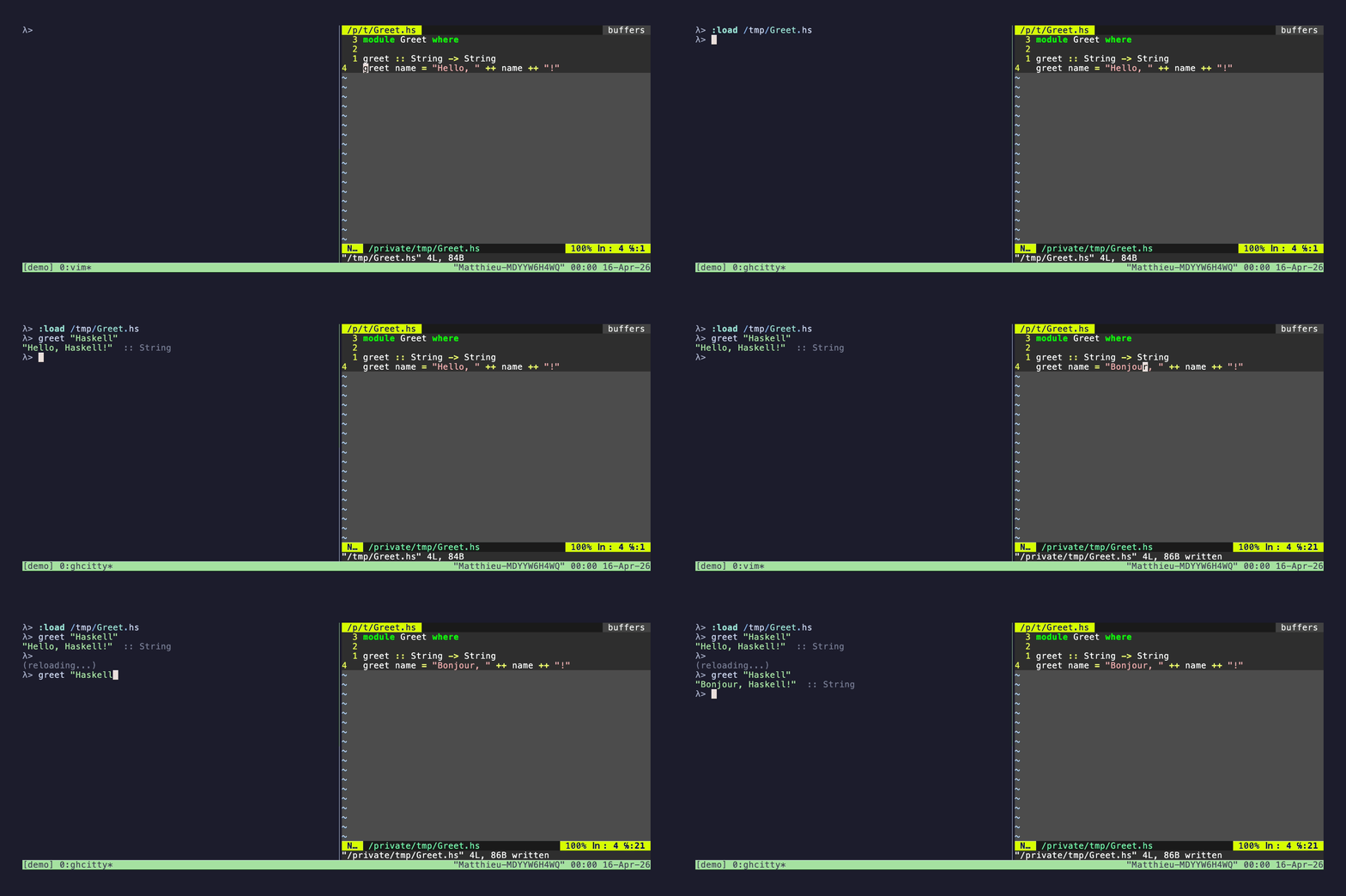
Auto-reload
Edit a loaded file and ghcitty picks up the changes automatically without :r
Commands
All GHCi : commands pass through. Extras:
:hoogle <???>              Search Hoogle for <???>
:doc <???>                 Haddock docs for <???> via Hoogle
:/ OR :/<???>              Show all bindings OR fuzzy search for <???> binding
:e OR :edit OR <CTRL> + g  Open $EDITOR, eval on save
:scratch                   Open the persistent Scratch.hs in $EDITOR, :load on save (no args)
:undo <N>                  Undo last <N> expressions
:config                    List runtime config
:config_<key> [value]      Toggle a bool, or set a value (session-only)
Config
~/.ghcitty (key=value) sets the persisted defaults:
pretty_errors = true
pretty_print = true
max_output_lines = 50    # 0 disables
max_output_chars = 3000  # 0 disable
show_timing = false      # show eval timing (default: false)
Tweak any of these for the current session with :config_<key>. Bool keys
toggle when called with no argument:
:config_pretty_print
:config_max_output_lines 200
:config_max_output_lines 0
# Show all options...
:config
FAQ
Why a GHCi wrapper?
First and foremost, for personal use (and frivolous good fun ... to each his own). The precise goal was to have a smooth and aesthetic way to interact with Haskell programs.
It might also be of small use to happy hackers who still program.
How does it work?
- Commands are fenced with sentinel markers so ghcitty knows exactly where your output begins and ends.
- For eval, it sends
:type exprfirst to capture the type, then the expression itself. - Definitions skip the type query and look up the bound name after.
- All GHCi
:commands pass through. The one exception is:set prompt: ghcitty drives GHCi via a sentinel prompt, so it rejects prompt changes rather than deadlocking. Ctrl+Cis forwarded to GHCi via the PTY so a long-running expression aborts instead of killing the REPL.
How do the multiline heuristics work?
Basically "automatic" multiline uses a pretty simple and reliable heuristic...
- We enter multiline on trailing
=,do,where,etc, unbalanced brackets, etc Blank line+<RET>submits your expression- Bracketed paste is treated as if you used a
:{/:}block
How does completion work?
<TAB>opens a columnar menu using:complete replwith full line context, so:m + Data.Li<Tab>completes module names.- For short candidate lists, the type of each match shows alongside it.
- Ghcitty's own slash commands (
:scratch,:config_*,:edit,:undo,:doc,:hoogle) appear in completions and ghost hints too. - Ghost completions show the top match dimmed after 2+ chars.
How does the hoogle integration work?
It tries the local hoogle CLI first, falls back to web API...
How do sessions work?
Every eval is appended to ~/.local/share/ghcitty/<session>.hs. --continue replays on startup.