NAME
grub2-theme-preview — :city_sunrise: Preview a full GRUB 2.x theme (or just a background image) using KVM / QEMU
SYNOPSIS
pip3 install --userINFO
DESCRIPTION
:city_sunrise: Preview a full GRUB 2.x theme (or just a background image) using KVM / QEMU
README



About
grub2-theme-preview came into life when I was looking around for available GRUB 2.x themes and wanted a way to quickly see a theme in action without rebooting real hardware.
It takes a theme folder (or just a single picture),
creates a temporary bootable image using grub2-mkrescue and launches
that image in a virtual machine using KVM/QEMU, all without root privileges.
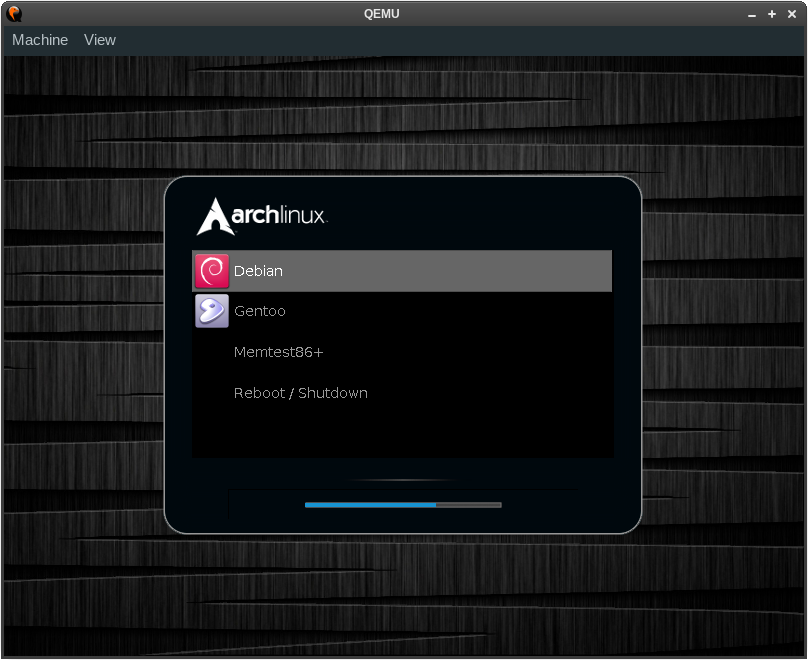
(Showing theme gutsblack-archlinux)
Installation
To install the latest release from PyPI:
# pip3 install --user grub2-theme-preview
To install from a Git clone for development:
# pip3 install --user --editable .
Please make sure to install these non-PyPI dependencies as well:
grub-mkrescueof GRUB 2 (packagegrub-commonon Debian and Ubuntu)- QEMU (with GTK or SDL display support) — hypervisor that performs hardware virtualization
- OVMF — EFI bios image for use with QEMU
- mtools — collection of utilities to access MS-DOS
xorrisoof libisoburn — frontend which enables creation and expansion of the ISO format
Usage
# COLUMNS=80 grub2-theme-preview --help usage: grub2-theme-preview [-h] [--grub-cfg PATH] [--verbose] [--resolution WxH] [--timeout SECONDS] [--add TARGET=/SOURCE] [--version] [--grub2-mkrescue COMMAND] [--qemu COMMAND] [--xorriso COMMAND] [--display DISPLAY] [--full-screen] [--no-kvm] [--vga CARD] [--debug] [--plain-rescue-image] PATHPreview a GRUB 2.x theme using KVM/QEMU
positional arguments: PATH path of theme directory (or PNG/TGA image file) to preview
options: -h, --help show this help message and exit --grub-cfg PATH path of custom grub.cfg file to use (default: /boot/grub{2,}/grub.cfg) --verbose increase verbosity --resolution WxH set a custom resolution, e.g. 800x600 --timeout SECONDS set GRUB timeout in whole seconds or -1 to disable (default: 30 seconds) --add TARGET=/SOURCE make grub2-mkrescue add file(s) from /SOURCE to /TARGET in the rescue image (can be passed multiple times) --version show program's version number and exit
command location arguments: --grub2-mkrescue COMMAND grub2-mkrescue command (default: auto-detect) --qemu COMMAND KVM/QEMU command (default: qemu-system-<machine>) --xorriso COMMAND xorriso command (default: xorriso)
arguments related to invokation of QEMU/KVM: --display DISPLAY pass "-display DISPLAY" to QEMU, see "man qemu" for details (default: use QEMU's default display, hopefully either GTK or SDL) --full-screen pass "-full-screen" to QEMU --no-kvm do not pass -enable-kvm to QEMU (and hence fall back to acceleration "tcg" which is significantly slower than KVM) --vga CARD pass "-vga CARD" to QEMU, see "man qemu" for details (default: use QEMU's default VGA card)
debugging arguments: --debug enable debugging output --plain-rescue-image use unprocessed GRUB rescue image with no theme patched in; useful for checking if a plain GRUB rescue image shows up a GRUB shell, successfully.
environment variables: G2TP_GRUB_LIB Path of GRUB platform files parent directory (default: "/usr/lib/grub") G2TP_OVMF_IMAGE Path of OVMF image file (default: auto-detect) (e.g. "/usr/share/[..]/OVMF_CODE.fd")
Software libre licensed under GPL v2 or later. Brought to you by Sebastian Pipping <sebastian@pipping.org>.
Please report bugs at https://github.com/hartwork/grub2-theme-preview -- thank you!