NAME
layoutz — Simple, beautiful CLI output
SYNOPSIS
INFO
DESCRIPTION
Simple, beautiful CLI output
README
 d4
d4
 layoutz
Simple, beautiful CLI output 🪶
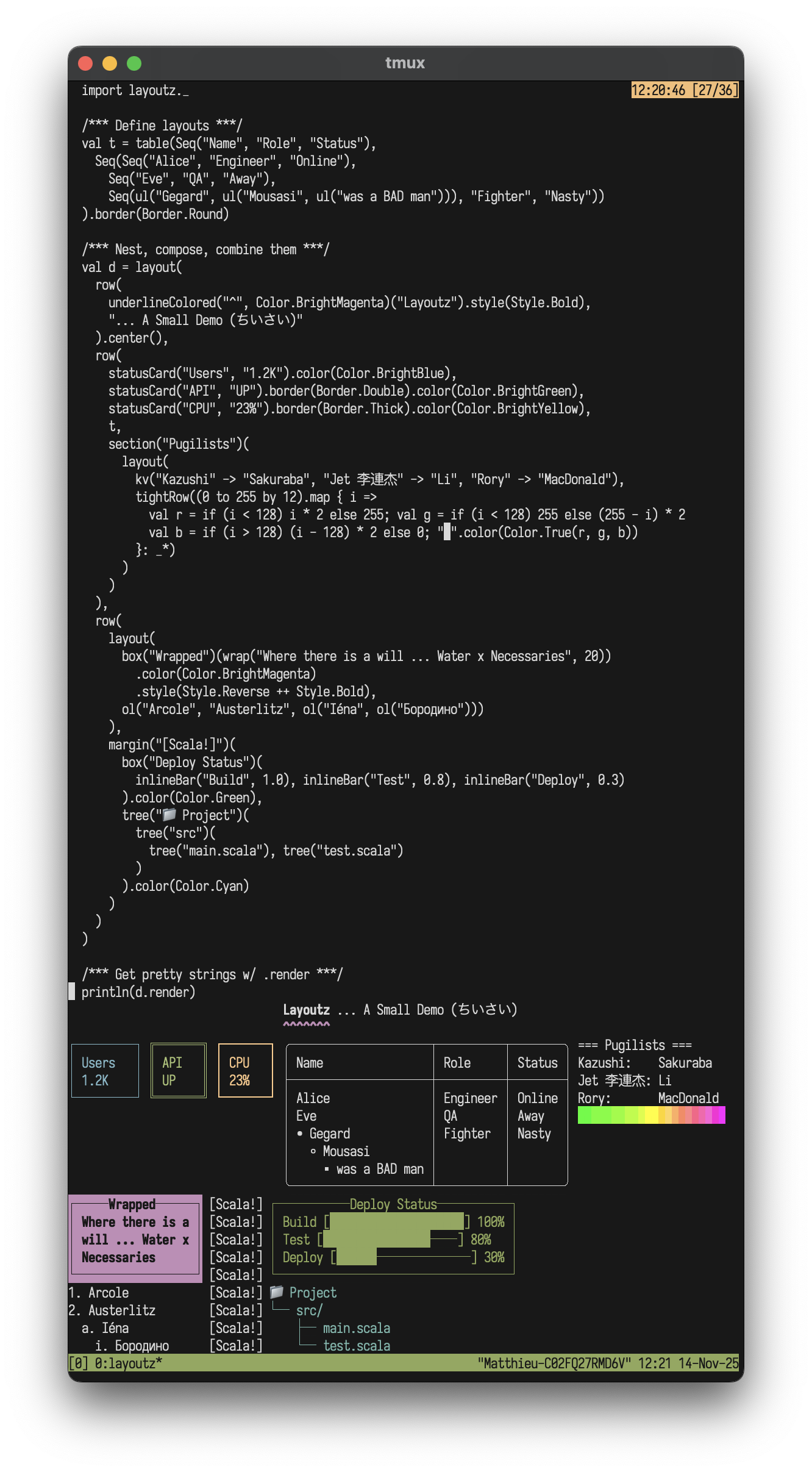
A lightweight, zero-dep lib to build compositional ANSI strings, terminal plots, and interactive Elm-style TUI's in pure Scala.
Features
- Pure Scala, zero-dependencies (JVM, Native, JS)
- Elm-style TUIs
- Layout primitives, tables, trees, lists, CJK-aware
- Colors, ANSI styles, rich formatting
- Terminal charts and plots
- Widgets: text input, spinners, progress bars
- Extend
Elementand easily create new primitives- (No component library limitations)
- Built-in commands (file I/O, HTTP requests, clipboard handling)

Layoutz also lets you easily drop animations into build scripts or any processes that use Stdout:

Table of Contents
- Installation
- Quick Start
- Core Concepts
- Border Styles
- Elements
- Colors & Styles
- Charts & Plots
- Interactive Apps
- Examples
- Contributing
Installation
On MavenCentral, cross-built for Scala 2.12, 2.13, 3.x (JVM, JS and Native):
"xyz.matthieucourt" %% "layoutz" % "0.7.0"
scala-cli repl --scala 3 --dep xyz.matthieucourt:layoutz_3:0.7.0
import layoutz._
Quick Start
There are two usage paths with this little package:
(1/2) Static rendering
Beautiful + compositional strings
show code
import layoutz._

/* Model your domain as usual */
case class TypeError(
    file: String,
    line: Int,
    prefix: String,
    bad: String,
    expected: String,
    found: String,
    hint: String
)

/* Bridge to layoutz with tiny pure functions using layoutz `Element`s */
def typeError(e: TypeError): Element = {
  val ln = e.line.toString
  val bar = "│".color(Color.Cyan)
  layout(
    rowTight(
      "── TYPE MISMATCH ".color(Color.Cyan),
      s"${e.file}:${e.line}".style(Style.Dim),
      " ────────".color(Color.Cyan)
    ),
    rowTight(ln.color(Color.Cyan), space, bar, space, e.prefix, e.bad),
    rowTight(
      space(ln.length + 1),
      bar,
      space,
      space(e.prefix.length),
      ("^" * e.bad.length + " ").color(Color.Red),
      "expected ",
      e.expected.color(Color.Green),
      ", found ",
      e.found.color(Color.Red)
    ),
    rowTight(
      space(ln.length + 1),
      bar,
      space,
      "hint: ".color(Color.Cyan),
      e.hint
    )
  )
}

/* Compose and nest at will */
val demo = layout(
  underline("─", Color.BrightCyan)("Layoutz - レイアウツ 🌍🌸").center(),
  row(
    statusCard("API", "LIVE").border(Border.Round).color(Color.Green),
    statusCard("DB", "99.9%").border(Border.Double).color(Color.BrightMagenta),
    statusCard("Système", "OK").border(Border.Thick).color(Color.Cyan)
  ).center(),
  "",
  box("Composition")(
    columns(
      plot(width = 30, height = 8)(
        Series((0 to 60).map(i => (i.toDouble, math.sin(i * 0.15) * 3)), "sin").color(Color.Cyan),
        Series((0 to 60).map(i => (i.toDouble, math.cos(i * 0.15) * 3)), "cos").color(Color.Magenta)
      ),
      tree("src")(
        tree("main")(
          tree("App.scala")
        ),
        tree("test")(
          tree("AppTest.scala")
        )
      )
    )
  ).border(Border.Round).center(),
  "",
  typeError(
    TypeError(
      "Foo.scala",
      42,
      "val x: Int = ",
      "getName()",
      "Int",
      "String",
      "try `.toInt`"
    )
  )
)

/* Get pretty strings with `render` */
println(demo.render)

(2/2) Interactive apps
Build Elm-style TUIs
import layoutz._object CounterApp extends LayoutzApp[Int, String] { def init = 0
def update(msg: String, count: Int) = msg match { case "inc" => count + 1 case "dec" => count - 1 case _ => count }
def subscriptions(count: Int) = Sub.onKeyPress { case Key.Char('+') => Some("inc") case Key.Char('-') => Some("dec") case _ => None }
def view(count: Int) = layout( section("Counter")(s"Count: $count"), br, ul("Press
+or-") ) }
CounterApp.run

Why layoutz?
- We have
s"...", and full-blown TUI libraries - but there is a gap in-between. - With LLM's, boilerplate code that formats & "pretty-prints" is cheaper than ever...
- Thus, more than ever, "string formatting code" is spawning, and polluting domain logic
- Ultimately, layoutz is just a tiny, declarative DSL to combat this
- On the side, layoutz also has an Elm-style runtime to bring these arbitrary "Elements" to life: much like a flipbook.
- The runtime has some little niceties built-in like common cmd's for file I/O, HTTP-requests, and a key input handler
- But at the end of the day, you can use layoutz merely to structure Strings (without any of the TUI stuff)
Core Concepts
Every piece of content is an Element. Elements are immutable and composable.
layout(elem1, elem2, elem3)   // vertical
row(elem1, elem2)             // horizontal
elem.render                   // gives a String
elem.putStrLn                 // prints to console
Implement Element to create custom components that compose with all built-ins.
Fluent API
Some typesetting elements work as both nouns ("an underline") and verbs ("to underline something"). For these, layoutz offers a fluent syntax with transformations available in infix position via dot-completion. Both styles produce the same case classes and render identically:
Nested style:
margin(">>")(underline()("Hello\nWorld!"))
Fluent style:
"Hello\nWorld!".underline.margin(">>")
Both render:
>> Hello
>> World!
>> ──────
Available: .center(), .pad(), .wrap(), .truncate(), .underline(), .margin(), .color(), .bg(), .style(), .border()
Border Styles
Applied via .border() to any element with the HasBorder typeclass (box, statusCard, table):
box("Title")("content").border(Border.Round)
table(h, r).border(Border.Thick)
// HasBorder typeclass for generic code
def makeThick[T: HasBorder](element: T): T = element.border(Border.Thick)
Border.Single                              // ┌─┐ (default)
Border.Double                              // ╔═╗
Border.Thick                               // ┏━┓
Border.Round                               // ╭─╮
Border.Ascii                               // +-+
Border.Block                               // ███
Border.Dashed                              // ┌╌┐
Border.Dotted                              // ┌┈┐
Border.InnerHalfBlock                      // ▗▄▖
Border.OuterHalfBlock                      // ▛▀▜
Border.Markdown                            // |-|
Border.Custom(corner = "+", horizontal = "=", vertical = "|")
Border.None                                // no borders
Elements
Text
"Simple text" // Implicit conversion to `Text`
Line Break: br
layout("Line 1", br, "Line 2")
Layout (vertical): layout
layout("First", "Second", "Third")
First
Second
Third
Row (horizontal): row
row("Left", "Middle", "Right")
columns(layout("A", "B"), layout("C", "D"))  // Side-by-side columns
Left Middle Right
Horizontal Rule: hr
hr                         // default ──────────
hr.char("~")               // custom char
hr.width(10).char("=")     // custom char + width

Vertical Rule: vr
vr(3)
Section: section
section("Config")(kv("env" -> "prod"))
=== Config ===
env : prod
Box: box
box("Summary")(kv("total" -> "42"))
box("Fancy")("content").border(Border.Double)
box("Smooth")("content").border(Border.Round)

Status Card: statusCard
row(
  statusCard("CPU", "45%").color(Color.Green),
  statusCard("MEM", "2.1G").color(Color.Cyan)
)

Banner: banner
banner("System Dashboard").border(Border.Double)

Table: table
table(
  headers = Seq("Name", "Age", "City"),
  rows = Seq(
    Seq("Alice", "30", "New York"),
    Seq("Bob", "25"),
    Seq("Charlie", "35", "London")
  )
)

Key-Value: kv
kv("name" -> "Alice", "role" -> "admin")
name : Alice
role : admin
Unordered List: ul
ul("Backend", ul("API", ul("REST", "GraphQL"), "DB"), "Frontend")
• Backend
  ◦ API
    ▪ REST
    ▪ GraphQL
  ◦ DB
• Frontend
Ordered List: ol
ol("Setup", ol("Install deps", ol("npm", "pip"), "Configure"), "Deploy")
1. Setup
  a. Install deps
    i. npm
    ii. pip
  b. Configure
2. Deploy
Tree: tree
tree("Project")(
  tree("src")(
    tree("main")(tree("App.???")),
    tree("test")(tree("AppTest.???"))
  )
)

Progress Bar: inlineBar
inlineBar("Download", 0.75)
Download [███████████████─────] 75%
Chart: chart
chart("Web" -> 10, "Mobile" -> 20, "API" -> 15)
Spinner: spinner
8 built-in styles:
spinner("Loading", frame, SpinnerStyle.Dots)   // ⠋ ⠙ ⠹ ⠸ ⠼ ⠴ ⠦ ⠧ ⠇ ⠏
spinner("Loading", frame, SpinnerStyle.Line)   // | / - \
spinner("Loading", frame, SpinnerStyle.Clock)  // 🕐 🕑 🕒 🕓 🕔 🕕 🕖 🕗 🕘 🕙 🕚 🕛
spinner("Loading", frame, SpinnerStyle.Bounce) // ⠁ ⠂ ⠄ ⠂
spinner("Loading", frame, SpinnerStyle.Earth)  // 🌍 🌎 🌏
spinner("Loading", frame, SpinnerStyle.Moon)   // 🌑 🌒 🌓 🌔 🌕 🌖 🌗 🌘
spinner("Loading", frame, SpinnerStyle.Grow)   // ▏ ▎ ▍ ▌ ▋ ▊ ▉ █ ▉ ▊ ▋ ▌ ▍ ▎
spinner("Loading", frame, SpinnerStyle.Arrow)  // ← ↖ ↑ ↗ → ↘ ↓ ↙
Alignment: center, leftAlign, rightAlign, justify, wrap
"TITLE".center(20)
"Left".leftAlign(20)
"Right".rightAlign(20)
"Spread this out".justify(30)
"Long text here that should wrap".wrap(20)
       TITLE
Left
               Right
Spread    this   out
Long text here that
should wrap
Underline: underline
"Title".underline()
"Custom".underline("=")
Title
─────
Custom
══════
Margin: margin
layout(
  "Ooops!",
  row("val result: Int = ", underline("^")("getString()")),
  "Expected Int, found String"
).margin("[error]")

Padding & Truncation: pad, truncate
"content".pad(2)
"Very long text that will be cut off".truncate(15)
"Custom ellipsis example text here".truncate(20, "…")
Form Widgets: textInput, SingleChoice, MultiChoice
textInput("Username", "alice", "Enter name", active = true)
SingleChoice("Mood?", Seq("great", "okay", "meh"), selected = 0, active = true)
MultiChoice("Colors?", Seq("Red", "Blue"), selected = Set(0), cursor = 1, active = true)
> Username: alice_
> Mood?
  ► ● great
    ○ okay
    ○ meh
Spacing: space, empty
space(10)                                    // Horizontal spacing
empty                                        // No-op (conditional rendering)
Custom Elements
Implement Element to create reusable components:
case class Square(size: Int) extends Element {
  def render: String = {
    if (size < 2) return ""
    val width = size * 2 - 2
    val top = "┌" + ("─" * width) + "┐"
    val middle = (1 to size - 2).map(_ => "│" + (" " * width) + "│")
    val bottom = "└" + ("─" * width) + "┘"
    (top +: middle :+ bottom).mkString("\n")
  }
}
row(Square(2), Square(4), Square(6))

Working with Collections
case class User(name: String, role: String)
val users = Seq(User("Alice", "Admin"), User("Bob", "User"), User("Tom", "User"))
section("Users by Role")(
layout(
users.groupBy(.role).map { case (role, roleUsers) =>
box(role)(ul(roleUsers.map(.name): _))
}.toSeq: _
)
)
Colors
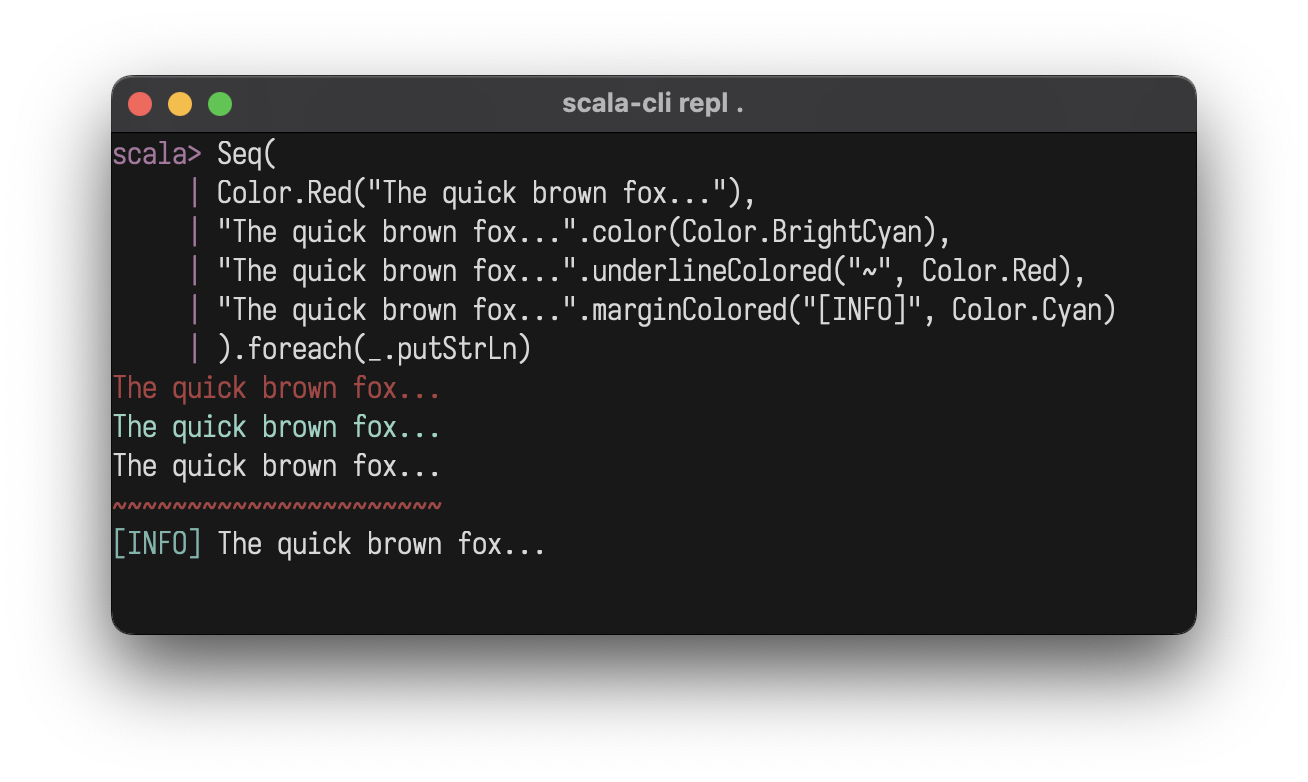
Foreground with .color, background with .bg:
Color.Red("Error!")
"text".color(Color.BrightCyan)
"Error!".bg(Color.Red)
Color.Red.bg("Error!")
"ALERT".bg(Color.Red).color(Color.White).style(Style.Bold)
box()("warning").bg(Color.Yellow)
Color.Black
Color.Red
Color.Green
Color.Yellow
Color.Blue
Color.Magenta
Color.Cyan
Color.White
Color.BrightBlack             // Bright 8
Color.BrightRed
Color.BrightGreen
Color.BrightYellow
Color.BrightBlue
Color.BrightMagenta
Color.BrightCyan
Color.BrightWhite
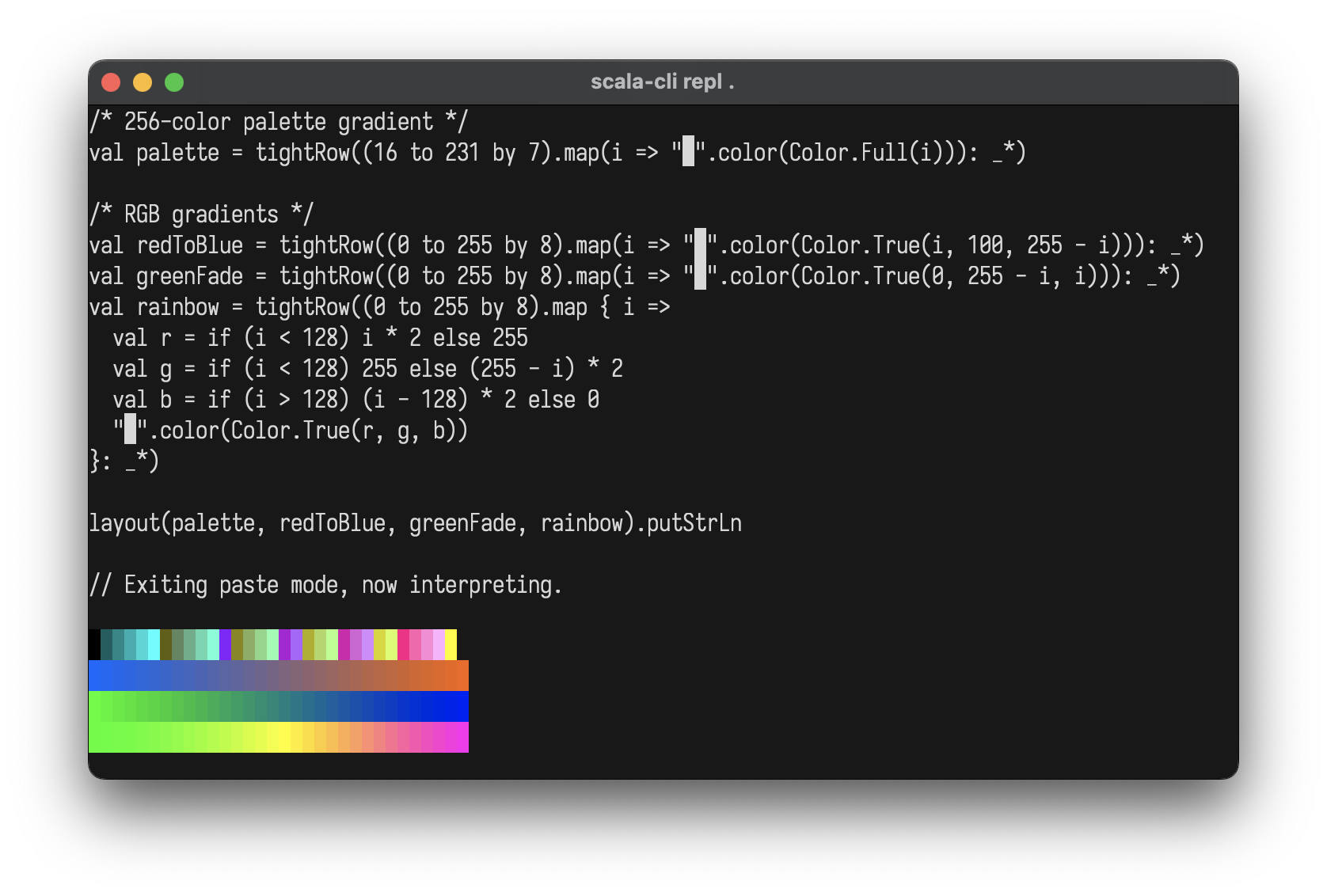
Color.Full(196)               // 256-color palette (0-255)
Color.True(255, 128, 0)       // 24-bit RGB
Color.NoColor                 // Conditional no-op
import layoutz._

/* 256-color palette gradient */
val palette = tightRow((16 to 231 by 7).map(i => "█".color(Color.Full(i))): _*)

/* RGB gradients */
val redToBlue = tightRow((0 to 255 by 8).map(i => "█".color(Color.True(i, 100, 255 - i))): _*)
val greenFade = tightRow((0 to 255 by 8).map(i => "█".color(Color.True(0, 255 - i, i))): _*)
val rainbow = tightRow((0 to 255 by 8).map { i =>
  val r = if (i < 128) i * 2 else 255
  val g = if (i < 128) 255 else (255 - i) * 2
  val b = if (i > 128) (i - 128) * 2 else 0
  "█".color(Color.True(r, g, b))
}: _*)

layout(palette, redToBlue, greenFade, rainbow)
Styles
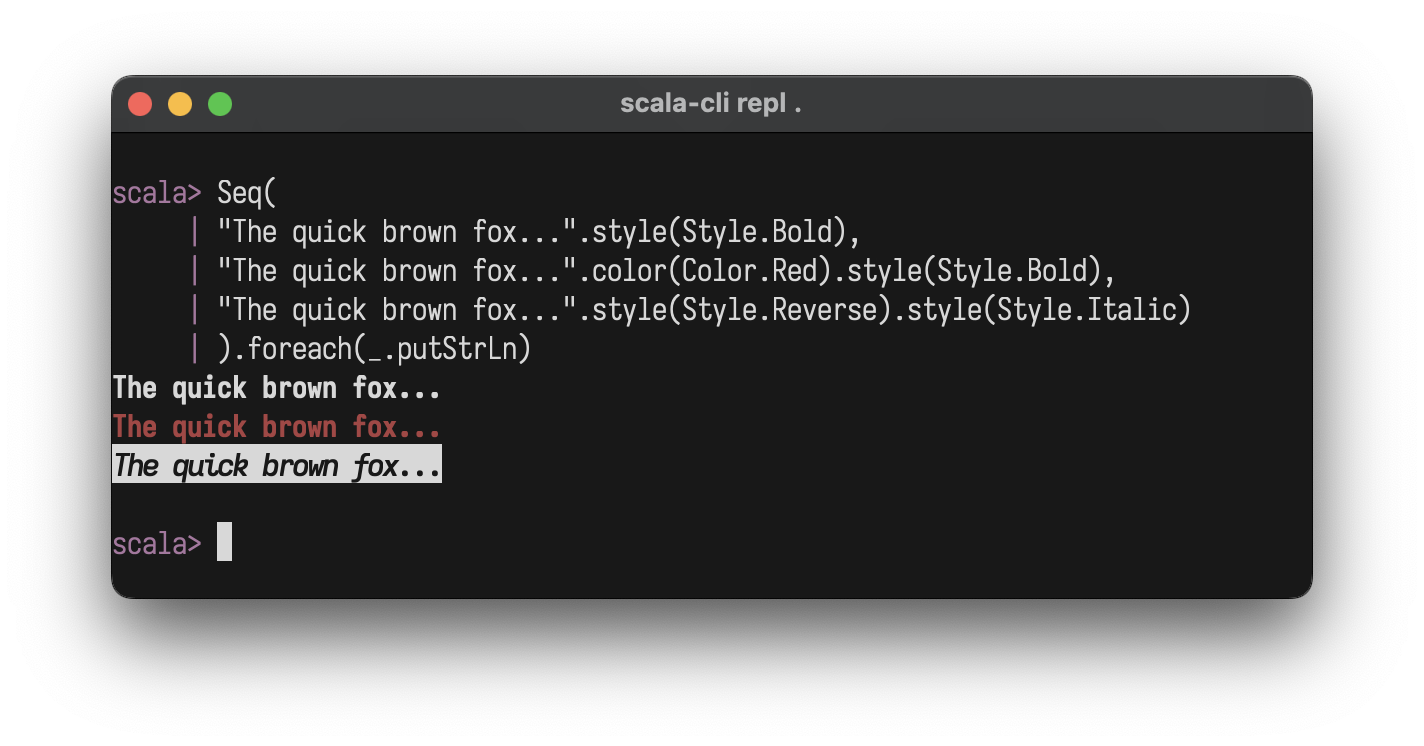
"text".style(Style.Bold)
"text".color(Color.Red).style(Style.Bold)
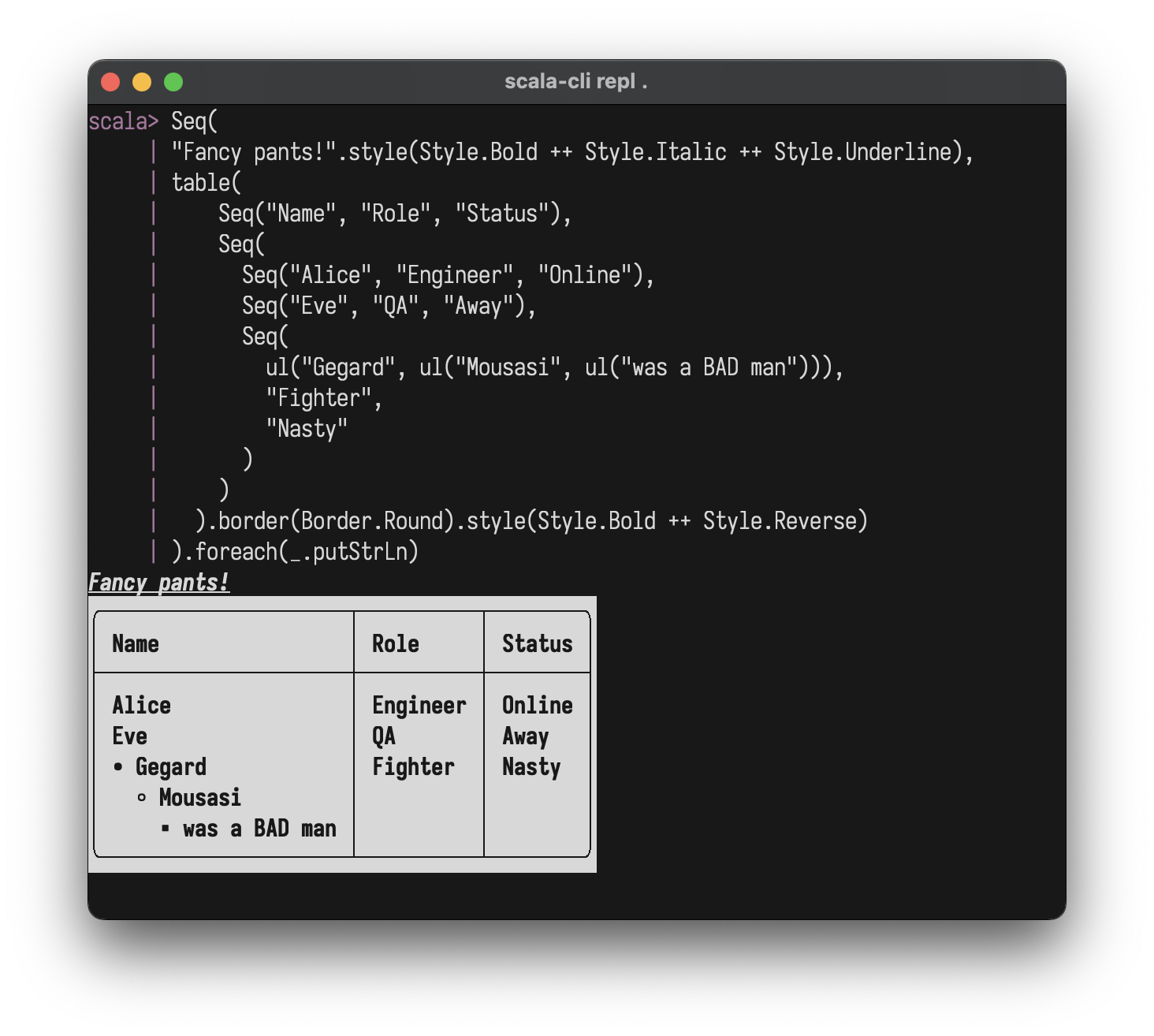
"text".style(Style.Bold ++ Style.Italic ++ Style.Underline)
Style.Bold
Style.Dim
Style.Italic
Style.Underline
Style.Blink
Style.Reverse
Style.Hidden
Style.Strikethrough
Style.NoStyle                 // conditional no-op
Style.Bold ++ Style.Italic    // combine with ++
Charts & Plots
Line Plot
val sinePoints = (0 to 100).map(i => (i.toDouble, math.sin(i * 0.1) * 10))
plot(width = 40, height = 10)(
  Series(sinePoints, "sine").color(Color.Cyan)
)

Multiple series:
val sin = (0 to 50).map(i => (i.toDouble, math.sin(i * 0.15) * 5))
val cos = (0 to 50).map(i => (i.toDouble, math.cos(i * 0.15) * 5))
plot(width = 50, height = 12)(
Series(sin, "sin(x)").color(Color.BrightCyan),
Series(cos, "cos(x)").color(Color.BrightMagenta)
)

Options: width, height, showAxes, showOrigin
Horizontal Chart
chart("Web" -> 10, "Mobile" -> 20, "API" -> 15)
Pie Chart
pie()(
  Slice(50, "Liquor"),
  Slice(20, "Protein"),
  Slice(10, "Water"),
  Slice(20, "Fun")
)

Bar Chart
bar(width = 40, height = 10)(
  Bar(100, "Mon"), Bar(120, "Tue"), Bar(110, "Wed"),
  Bar(85, "Thu"), Bar(115, "Fri")
)

Custom colors:
bar()(
  Bar(100, "Sales").color(Color.Magenta),
  Bar(80, "Costs").color(Color.BrightRed),
  Bar(20, "Profit").color(Color.Cyan)
)

Stacked Bar Chart
stackedBar(width = 40, height = 10)(
  StackedBar(Seq(Bar(30, "Q1"), Bar(20, "Q2"), Bar(25, "Q3")), "2022"),
  StackedBar(Seq(Bar(35, "Q1"), Bar(25, "Q2"), Bar(30, "Q3")), "2023"),
  StackedBar(Seq(Bar(40, "Q1"), Bar(30, "Q2"), Bar(35, "Q3")), "2024")
)

Sparkline
sparkline(Seq(1, 4, 2, 8, 5, 7, 3, 6))
sparkline(Seq(10, 20, 15, 30, 25, 40, 35)).color(Color.Cyan)

Box Plot
boxPlot(height = 12)(
  BoxData("A", min = 10, q1 = 25, median = 50, q3 = 75, max = 90).color(Color.Cyan),
  BoxData("B", min = 20, q1 = 40, median = 55, q3 = 70, max = 85).color(Color.Magenta),
  BoxData("C", min = 5, q1 = 30, median = 45, q3 = 60, max = 95).color(Color.Yellow)
)

Heatmap
heatmap(Seq(
  Seq(1.0, 2.0, 3.0),
  Seq(4.0, 5.0, 6.0),
  Seq(7.0, 8.0, 9.0)
))
/* With labels and settings */
Heatmap(
HeatmapData(
rows = Seq(
Seq(12.0, 15.0, 22.0, 28.0, 30.0, 25.0, 18.0),
Seq(14.0, 18.0, 25.0, 32.0, 35.0, 28.0, 20.0),
Seq(10.0, 13.0, 20.0, 26.0, 28.0, 22.0, 15.0)
),
rowLabels = Seq("Mon", "Tue", "Wed"),
colLabels = Seq("6am", "9am", "12pm", "3pm", "6pm", "9pm", "12am")
),
cellWidth = 5
)

Options: cellWidth, cellHeight, showLegend, row/column labels via HeatmapData.
Interactive Apps
LayoutzApp uses the Elm Architecture where your
view is simply a layoutz.Element
[!WARNING]
LayoutzAppis currently JVM + Native only
trait LayoutzApp[State, Message] {
  def init: (State, Cmd[Message])
  def update(msg: Message, state: State): (State, Cmd[Message])
  def subscriptions(state: State): Sub[Message]
  def view(state: State): Element
}
Three daemon threads coordinate rendering (~50ms), tick/timers, and input capture. State updates flow through update synchronously. Rendering uses incremental line-diffing: only changed lines are redrawn, eliminating flicker.
app.run(
  tickIntervalMs   = 100,              // Subscription polling rate
  renderIntervalMs = 50,               // Screen refresh rate
  clearOnStart     = true,             // Clear screen on launch
  clearOnExit      = true,             // Clear screen on quit
  showQuitMessage  = false,            // Display quit hint
  quitMessage      = "Ctrl+Q to quit", // Custom quit text
  quitKey          = Key.Ctrl('Q'),    // Quit on this key
  alignment        = Alignment.Left    // Left | Center | Right
)
Implicit conversion: return just state instead of (state, Cmd.none):
def update(msg: Msg, state: State) = msg match {
  case Increment => state.copy(count = state.count + 1)
  case LoadData  => (state.copy(loading = true), Cmd.file.read("data.txt", DataLoaded))
}
Key Types
// Printable Key.Char(c: Char)// Editing Key.Enter Key.Backspace Key.Tab Key.Escape Key.Delete
// Navigation Key.Up Key.Down Key.Left Key.Right Key.Home Key.End Key.PageUp Key.PageDown
// Modifiers Key.Ctrl(c: Char) // Ctrl+A, Ctrl+S, etc. Key.Unknown(code: Int) // Unrecognized input
Subscriptions
Sub.none                                           // No subscriptions
Sub.onKeyPress { case Key.Char('q') => Some(Quit)  // Keyboard input
                 case _ => None }
Sub.time.everyMs(intervalMs, msg)                  // Periodic ticks
Sub.file.watch(path, onChange)                     // File changes
Sub.http.pollMs(url, intervalMs, onResponse)       // HTTP polling
Sub.batch(sub1, sub2, ...)                         // Combine multiple
def subscriptions(state: State) = Sub.batch(
  Sub.time.everyMs(100, Tick),
  Sub.file.watch("config.json", ConfigChanged),
  Sub.onKeyPress { case Key.Char('q') => Some(Quit); case _ => None }
)
Commands
Cmd.none                                         // No-op (default)
Cmd.exit                                         // Exit the application
Cmd.batch(cmd1, cmd2, ...)                       // Execute multiple commands
Cmd.task(expr)(toMsg)                            // Async task, result as Either
Cmd.fire(effect)                                 // Fire and forget
Cmd.afterMs(delayMs, msg)                        // One-shot delayed message
Cmd.showCursor                                   // Show terminal cursor
Cmd.hideCursor                                   // Hide terminal cursor
Cmd.setTitle(title)                              // Set terminal window title
Cmd.file.read(path, onResult)                    // Read file
Cmd.file.write(path, content, onResult)          // Write file
Cmd.file.ls(path, onResult)                      // List directory
Cmd.file.cwd(onResult)                           // Get working directory
Cmd.http.get(url, onResult, headers)             // HTTP GET
Cmd.http.post(url, body, onResult, headers)      // HTTP POST
Cmd.clipboard.read(onResult)                     // Read clipboard
Cmd.clipboard.write(content, onResult)           // Write clipboard
Examples
Interactive TUI apps using LayoutzApp with built-in Cmd and Sub.
File viewer
Watch and display file contents
import layoutz._

case class FileState(content: String, error: Option[String])
sealed trait Msg
case class FileLoaded(result: Either[String, String]) extends Msg

object FileViewer extends LayoutzApp[FileState, Msg] {
  val filename = "README.md"

  def init = (FileState("Loading...", None), Cmd.file.read(filename, FileLoaded))

  def update(msg: Msg, state: FileState) = msg match {
    case FileLoaded(Right(content)) =>
      (state.copy(content = content.take(500), error = None), Cmd.none)
    case FileLoaded(Left(err)) =>
      (state.copy(error = Some(err)), Cmd.none)
  }

  def subscriptions(state: FileState) =
    Sub.file.watch(filename, FileLoaded)

  def view(state: FileState) = {
    val display = state.error match {
      case Some(err) => Color.BrightRed(s"Error: $err")
      case None => wrap(state.content, 60)
    }

    layout(
      underlineColored("=", Color.BrightMagenta)("File Viewer").style(Style.Bold),
      kv("File" -> filename).color(Color.BrightBlue),
      box("Content")(display).border(Border.Round),
      "Auto-reloads on file change".color(Color.BrightBlack)
    )
  }
}

FileViewer.run
Stopwatch timer
Custom timer using Sub.time.everyMs
import layoutz._

case class TimerState(seconds: Int, running: Boolean)
sealed trait Msg
case object Tick extends Msg
case object ToggleTimer extends Msg
case object ResetTimer extends Msg

object StopwatchApp extends LayoutzApp[TimerState, Msg] {
  def init = (TimerState(0, false), Cmd.none)

  def update(msg: Msg, state: TimerState) = msg match {
    case Tick =>
      (state.copy(seconds = state.seconds + 1), Cmd.none)
    case ToggleTimer =>
      (state.copy(running = !state.running), Cmd.none)
    case ResetTimer =>
      (TimerState(0, running = false), Cmd.none)
  }

  def subscriptions(state: TimerState) = Sub.batch(
    if (state.running) Sub.time.everyMs(1000, Tick) else Sub.none,
    Sub.onKeyPress {
      case Key.Char(' ') => Some(ToggleTimer)
      case Key.Char('r') => Some(ResetTimer)
      case _ => None
    }
  )

  def view(state: TimerState) = {
    val minutes = state.seconds / 60
    val secs = state.seconds % 60
    val timeDisplay = f"$minutes%02d:$secs%02d"

    val statusColor = if (state.running) Color.BrightGreen else Color.BrightYellow
    val statusText = if (state.running) "RUNNING" else "PAUSED"

    layout(
      underlineColored("=", Color.BrightCyan)("Stopwatch").style(Style.Bold),
      "",
      box("Time")(
        timeDisplay.style(Style.Bold).center(20)
      ).color(statusColor).border(Border.Double),
      "",
      kv(
        "Status" -> statusText,
        "Elapsed" -> s"${state.seconds}s"
      ).color(Color.BrightBlue),
      "",
      ul(
        "space: start/pause",
        "r: reset"
      ).color(Color.BrightBlack)
    )
  }
}

StopwatchApp.run
Custom side effects
Using Cmd.task for async operations
import layoutz._

case class TaskState(status: String = "idle", count: Int = 0)

sealed trait Msg
case object RunTask extends Msg
case class TaskDone(result: Either[String, String]) extends Msg

object SideEffectApp extends LayoutzApp[TaskState, Msg] {
  def init = (TaskState(), Cmd.none)

  def update(msg: Msg, state: TaskState) = msg match {
    case RunTask =>
      (state.copy(status = "running..."),
       Cmd.task {
         Thread.sleep(500)
         if (scala.util.Random.nextDouble() < 0.3)
           throw new Exception("Launch failure")
         "completed"
       }(TaskDone))

    case TaskDone(Right(_)) =>
      state.copy(status = "success", count = state.count + 1)

    case TaskDone(Left(err)) =>
      state.copy(status = s"error: $err")
  }

  def subscriptions(state: TaskState) = Sub.onKeyPress {
    case Key.Char('r') => Some(RunTask)
    case _ => None
  }

  def view(state: TaskState) = layout(
    section("Side Effect Demo")(
      kv("Status" -> state.status, "Count" -> state.count.toString)
    ),
    "r: run task".color(Color.BrightBlack)
  )
}

SideEffectApp.run
Use Cmd.fire for fire-and-forget effects (logging, analytics, etc.):
Cmd.fire(println("User clicked button"))
API poller
Poll API endpoint and display JSON
import layoutz._

case class ApiState(response: String, lastUpdate: String, error: Option[String])
sealed trait Msg
case class ApiResponse(result: Either[String, String]) extends Msg

object ApiPoller extends LayoutzApp[ApiState, Msg] {
  val apiUrl = "https://api.github.com/zen"

  def init = (ApiState("Loading...", "Never", None), Cmd.none)

  def update(msg: Msg, state: ApiState) = msg match {
    case ApiResponse(Right(data)) =>
      val now = java.time.LocalTime.now().toString.take(8)
      (state.copy(response = data, lastUpdate = now, error = None), Cmd.none)
    case ApiResponse(Left(err)) =>
      (state.copy(error = Some(err)), Cmd.none)
  }

  def subscriptions(state: ApiState) =
    Sub.http.pollMs(apiUrl, 3000, ApiResponse)

  def view(state: ApiState) = {
    val display = state.error match {
      case Some(err) => Color.BrightRed(s"Error: $err")
      case None => wrap(state.response, 60).color(Color.BrightGreen)
    }

    layout(
      underlineColored("~", Color.BrightCyan)("API Poller").style(Style.Bold),
      kv("Endpoint" -> apiUrl, "Last Update" -> state.lastUpdate).color(Color.BrightBlue),
      box("Response")(display).border(Border.Round),
      "Polls every 3s".color(Color.BrightBlack)
    )
  }
}

ApiPoller.run
Multi-endpoint monitor
Monitor multiple APIs with Sub.batch
import layoutz._

case class MonitorState(
  github: String = "...",
  httpbin: String = "...",
  placeholder: String = "..."
)

sealed trait Msg
case class GithubResp(result: Either[String, String]) extends Msg
case class HttpbinResp(result: Either[String, String]) extends Msg
case class PlaceholderResp(result: Either[String, String]) extends Msg

object MultiMonitor extends LayoutzApp[MonitorState, Msg] {
  def init = (MonitorState(), Cmd.none)

  def update(msg: Msg, state: MonitorState) = msg match {
    case GithubResp(Right(data)) => (state.copy(github = data.take(20)), Cmd.none)
    case GithubResp(Left(e)) => (state.copy(github = s"ERROR: $e"), Cmd.none)
    case HttpbinResp(Right(_)) => (state.copy(httpbin = "UP"), Cmd.none)
    case HttpbinResp(Left(e)) => (state.copy(httpbin = s"ERROR: $e"), Cmd.none)
    case PlaceholderResp(Right(_)) => (state.copy(placeholder = "UP"), Cmd.none)
    case PlaceholderResp(Left(e)) => (state.copy(placeholder = s"ERROR: $e"), Cmd.none)
  }

  def subscriptions(state: MonitorState) = Sub.batch(
    Sub.http.pollMs("https://api.github.com/zen", 4000, GithubResp),
    Sub.http.pollMs("https://httpbin.org/get", 5000, HttpbinResp),
    Sub.http.pollMs("https://jsonplaceholder.typicode.com/posts/1", 6000, PlaceholderResp)
  )

  def view(state: MonitorState) = layout(
    underlineColored("~", Color.BrightGreen)("Multi-API Monitor").style(Style.Bold),
    br,
    table(
      Seq("Service", "Status"),
      Seq(
        Seq("GitHub", state.github),
        Seq("HTTPBin", state.httpbin),
        Seq("JSONPlaceholder", state.placeholder)
      )
    ).border(Border.Round),
    br,
    "Auto-polls all endpoints".color(Color.BrightBlack)
  )
}

MultiMonitor.run
HTTP fetch on demand
Fetch data with Cmd.http.get
import layoutz._

case class FetchState(data: String, loading: Boolean, count: Int)
sealed trait Msg
case object Fetch extends Msg
case class Response(result: Either[String, String]) extends Msg

object HttpFetcher extends LayoutzApp[FetchState, Msg] {
  def init = (FetchState("Press 'f' to fetch", false, 0), Cmd.none)

  def update(msg: Msg, state: FetchState) = msg match {
    case Fetch =>
      (state.copy(loading = true, count = state.count + 1),
       Cmd.http.get("https://api.github.com/zen", Response))
    case Response(Right(data)) =>
      (state.copy(data = data, loading = false), Cmd.none)
    case Response(Left(err)) =>
      (state.copy(data = s"Error: $err", loading = false), Cmd.none)
  }

  def subscriptions(state: FetchState) = Sub.onKeyPress {
    case Key.Char('f') => Some(Fetch)
    case _ => None
  }

  def view(state: FetchState) = {
    val status: Element = if (state.loading) spinner("Fetching", state.count % 10)
                          else Text(s"Fetched ${state.count} times")

    layout(
      underlineColored("=", Color.BrightCyan)("HTTP Fetcher").style(Style.Bold),
      box("Zen Quote")(wrap(state.data, 50)).border(Border.Round).color(Color.BrightGreen),
      status,
      "f: fetch".color(Color.BrightBlack)
    )
  }
}

HttpFetcher.run
Complex task manager

Navigation, progress tracking, and stateful emojis
import layoutz._

case class TaskState(
    tasks: List[String],
    selected: Int,
    isLoading: Boolean,
    completed: Set[Int],
    progress: Double,
    startTime: Long,
    spinnerFrame: Int
)

sealed trait TaskMessage
case object MoveUp extends TaskMessage
case object MoveDown extends TaskMessage
case object StartTask extends TaskMessage
case object UpdateTick extends TaskMessage

object TaskApp extends LayoutzApp[TaskState, TaskMessage] {
  def init = (TaskState(
    tasks = List("Process data", "Generate reports", "Backup files"),
    selected = 0,
    isLoading = false,
    completed = Set.empty,
    progress = 0.0,
    startTime = 0,
    spinnerFrame = 0
  ), Cmd.none)

  def update(msg: TaskMessage, state: TaskState) = msg match {
    case MoveUp if !state.isLoading =>
      val newSelected =
        if (state.selected > 0) state.selected - 1 else state.tasks.length - 1
      (state.copy(selected = newSelected), Cmd.none)

    case MoveDown if !state.isLoading =>
      val newSelected =
        if (state.selected < state.tasks.length - 1) state.selected + 1 else 0
      (state.copy(selected = newSelected), Cmd.none)

    case StartTask if !state.isLoading =>
      (state.copy(
        isLoading = true,
        progress = 0.0,
        startTime = System.currentTimeMillis()
      ), Cmd.none)

    case UpdateTick if state.isLoading =>
      val elapsed = System.currentTimeMillis() - state.startTime
      val newProgress = math.min(1.0, elapsed / 3000.0)

      val newState = if (newProgress >= 1.0) {
        state.copy(
          isLoading = false,
          completed = state.completed + state.selected,
          progress = 1.0
        )
      } else {
        state.copy(progress = newProgress)
      }

      (newState.copy(spinnerFrame = newState.spinnerFrame + 1), Cmd.none)

    case UpdateTick => (state.copy(spinnerFrame = state.spinnerFrame + 1), Cmd.none)
    case _           => (state, Cmd.none)
  }

  def subscriptions(state: TaskState) = Sub.batch(
    Sub.time.everyMs(100, UpdateTick),
    Sub.onKeyPress {
      case Key.Char('w') | Key.Up   => Some(MoveUp)
      case Key.Char('s') | Key.Down => Some(MoveDown)
      case Key.Char(' ') | Key.Enter     => Some(StartTask)
      case _                           => None
    }
  )

  def view(state: TaskState) = {
    val taskList = state.tasks.zipWithIndex.map { case (task, index) =>
      val emoji =
        if (state.completed.contains(index)) "✅"
        else if (state.isLoading && index == state.selected) "⚡"
        else "📋"
      val marker = if (index == state.selected) "►" else " "
      s"$marker $emoji $task"
    }

    val status = if (state.isLoading) {
      layout(
        spinner("Processing", state.spinnerFrame),
        inlineBar("Progress", state.progress),
        f"${state.progress * 100}%.0f%% complete"
      )
    } else {
      layout("Press SPACE to start, W/S to navigate")
    }

    layout(
      section("Tasks")(Layout(taskList.map(Text))),
      section("Status")(status)
    )
  }
}

TaskApp.run
Form input widgets
Interactive forms with choice widgets
import layoutz._

case class FormState(
    name: String = "",
    mood: Int = 0,
    letters: Set[Int] = Set.empty,
    cursor: Int = 0,
    field: Int = 0
)

sealed trait Msg
case class TypeChar(c: Char) extends Msg
case object Backspace extends Msg
case object NextField extends Msg
case object MoveUp extends Msg
case object MoveDown extends Msg
case object Toggle extends Msg

object FormApp extends LayoutzApp[FormState, Msg] {
  val moods = Seq("great", "okay", "meh")
  val options = ('A' to 'F').map(_.toString).toSeq

  def init = (FormState(), Cmd.none)

  def update(msg: Msg, state: FormState) = msg match {
    case TypeChar(c) if state.field == 0 =>
      (state.copy(name = state.name + c), Cmd.none)
    case Backspace if state.field == 0 && state.name.nonEmpty =>
      (state.copy(name = state.name.dropRight(1)), Cmd.none)
    case MoveUp if state.field == 1 =>
      (state.copy(mood = (state.mood - 1 + moods.length) % moods.length), Cmd.none)
    case MoveDown if state.field == 1 =>
      (state.copy(mood = (state.mood + 1) % moods.length), Cmd.none)
    case MoveUp if state.field == 2 =>
      (state.copy(cursor = (state.cursor - 1 + options.length) % options.length), Cmd.none)
    case MoveDown if state.field == 2 =>
      (state.copy(cursor = (state.cursor + 1) % options.length), Cmd.none)
    case Toggle if state.field == 2 =>
      val newLetters = if (state.letters.contains(state.cursor))
        state.letters - state.cursor else state.letters + state.cursor
      (state.copy(letters = newLetters), Cmd.none)
    case NextField =>
      (state.copy(field = (state.field + 1) % 3), Cmd.none)
    case _ => (state, Cmd.none)
  }

  def subscriptions(state: FormState) = Sub.onKeyPress {
    case Key.Char(' ') if state.field == 2 => Some(Toggle)
    case Key.Char(c) if c.isLetterOrDigit || c == ' ' => Some(TypeChar(c))
    case Key.Backspace => Some(Backspace)
    case Key.Up => Some(MoveUp)
    case Key.Down => Some(MoveDown)
    case Key.Tab | Key.Enter => Some(NextField)
    case _ => None
  }

  def view(state: FormState) = layout(
    textInput("Name", state.name, "Type here", state.field == 0),
    SingleChoice("How was your day?", moods, state.mood, state.field == 1),
    MultiChoice("Favorite letters?", options, state.letters, state.cursor, state.field == 2)
  )
}
See FormExample.scala for a complete working example.
Clipboard read/write
Copy/paste with Cmd.clipboard
import layoutz._

case class ClipState(content: String = "", status: String = "Press 'r' to read clipboard")
sealed trait Msg
case class ClipRead(result: Either[String, String]) extends Msg
case class ClipWritten(result: Either[String, Unit]) extends Msg
case object ReadClip extends Msg
case object WriteClip extends Msg

object ClipboardApp extends LayoutzApp[ClipState, Msg] {
  def init = (ClipState(), Cmd.none)

  def update(msg: Msg, state: ClipState) = msg match {
    case ReadClip =>
      (state.copy(status = "Reading..."), Cmd.clipboard.read(ClipRead))
    case ClipRead(Right(text)) =>
      (state.copy(content = text.take(200), status = "Read OK"), Cmd.none)
    case ClipRead(Left(err)) =>
      (state.copy(status = s"Error: $err"), Cmd.none)
    case WriteClip =>
      (state.copy(status = "Writing..."),
       Cmd.clipboard.write("Hello from layoutz!", ClipWritten))
    case ClipWritten(Right(_)) =>
      (state.copy(status = "Written to clipboard!"), Cmd.none)
    case ClipWritten(Left(err)) =>
      (state.copy(status = s"Error: $err"), Cmd.none)
  }

  def subscriptions(state: ClipState) = Sub.onKeyPress {
    case Key.Char('r') => Some(ReadClip)
    case Key.Char('w') => Some(WriteClip)
    case _ => None
  }

  def view(state: ClipState) = layout(
    section("Clipboard Demo")(
      kv("Status" -> state.status),
      box("Content")(wrap(state.content, 60)).border(Border.Round)
    ),
    ul("r: read clipboard", "w: write to clipboard").color(Color.BrightBlack)
  )
}

ClipboardApp.run
Wizard game

Collect gems, avoid enemies
See SimpleGame.scala for the full source.
Contributing
You need Mill and a JDK (11+).
make test          # run all tests (JVM, JS, Native)
make compile       # compile all platforms
make repl          # Scala 3 REPL with layoutz loaded
make fmt           # scalafmt
Fork, make your change, make test, open a PR. Keep it zero-dep.