NAME
Repo-lyzer — Repo-lyzer is a developer-focused CLI tool built in Go language that analyzes and compares GitHub repositories to help…
SYNOPSIS
go install github.com/agnivo988/Repo-lyzer@v1.0.6INFO
DESCRIPTION
Repo-lyzer is a developer-focused CLI tool built in Go language that analyzes and compares GitHub repositories to help understand code structure, quality, and changes efficiently. It provides insights like file tree analysis, repository comparison, and actionable metrics, making it easier for developers and recruiters to evaluate projects quickly.
README
Maintainers
- @agnivo988
Contributors





![coderabbitai[bot]](https://github.com/coderabbitai.png "Bot Contributor")


Repo-lyzer

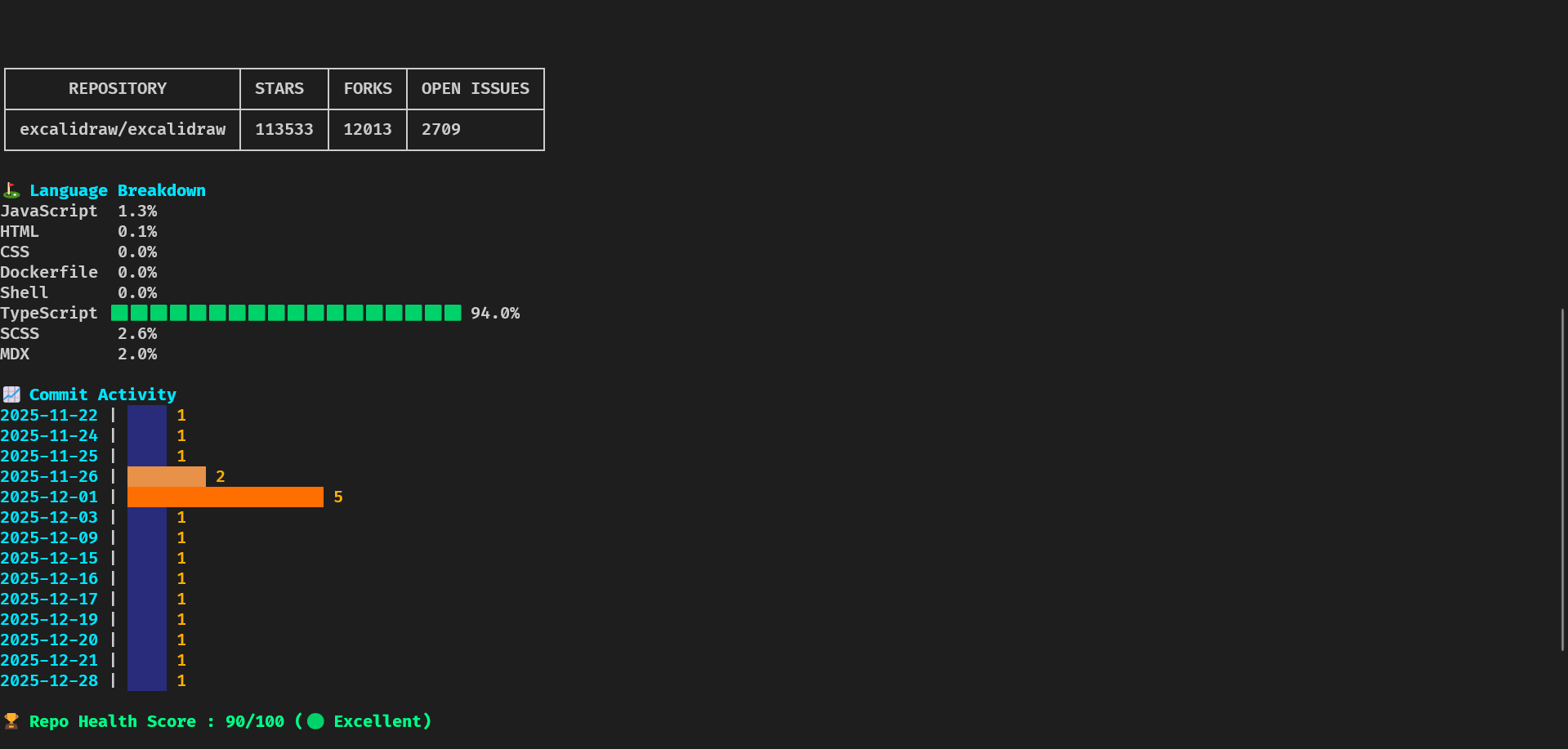
Repo-lyzer is a modern, terminal-based CLI tool written in Golang that analyzes GitHub repositories and presents insights in a beautifully formatted, interactive dashboard.
It is designed for developers, recruiters, and open-source enthusiasts to quickly evaluate a repository’s health, activity, and contributor statistics.
Who is Repo-lyzer for?
- Developers evaluating open-source projects
- Recruiters assessing repository health and activity
- Contributors exploring project structure and engagement
Features
- Repository Overview – Stars, forks, open issues, general info
- Language Breakdown – Percentage of languages used with colored bars
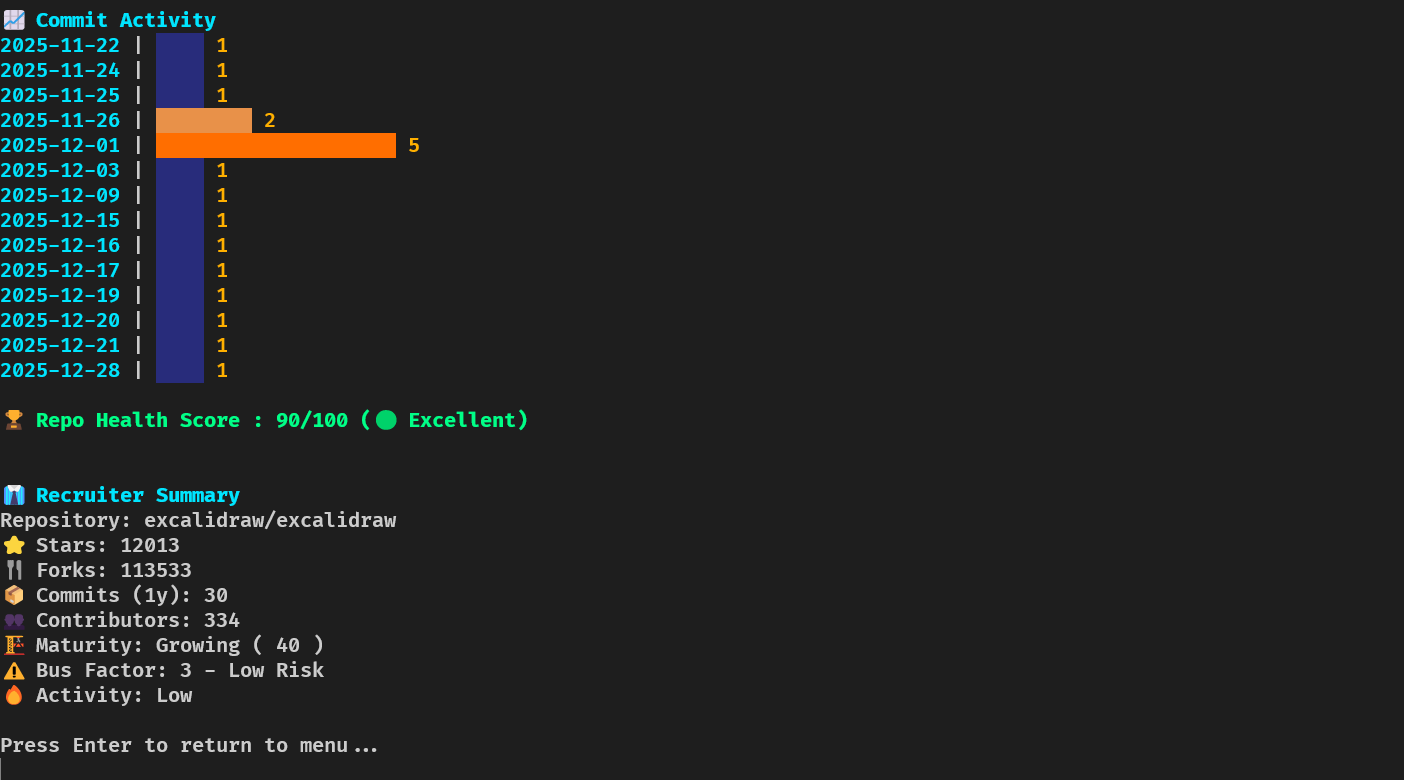
- Commit Activity – Horizontal graph showing commit frequency over the past year
- Health Score – Activity & contributor-based scoring
- Bus Factor – Measures critical contributors to assess project risk
- Repo Maturity Score – Evaluates age, activity, and structure
- Recruiter Summary – Quick snapshot for hiring evaluation
- Quick Summary – Fast 5-line overview with key metrics (commits 30d, top language, contributors, health, last commit)
- File Tree Viewer – Browse repository structure in-dashboard
- Export Options – Export analysis as JSON, Markdown, CSV, or HTML
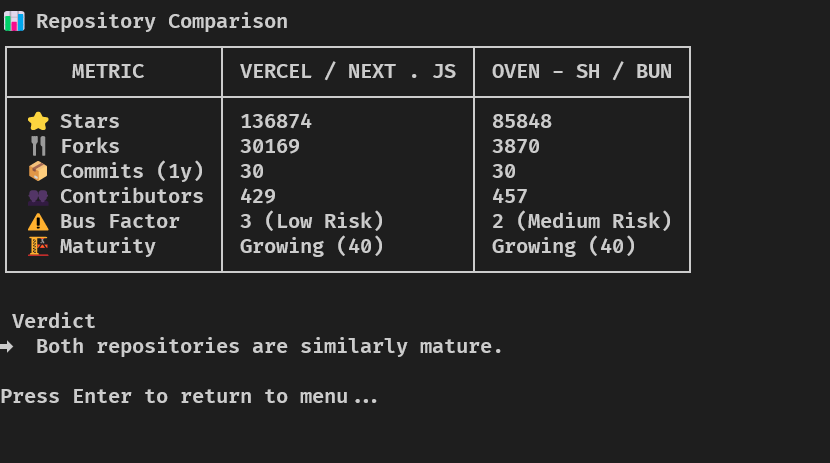
- Compare Mode – Side-by-side repository comparison
- Interactive CLI Menu – Fully navigable TUI (keyboard driven)
- Colorized Output – Neon-style colors and ASCII styling
- Settings Persistence – Theme, export preferences, and GitHub token saved locally
Tech Stack & Libraries
- Golang – Core language
- Cobra – CLI command management
- Bubble Tea – Interactive TUI
- Bubbles – UI components
- Lipgloss – Styling & layout
- Tablewriter – Terminal tables
- x/term – Terminal size detection
- GitHub REST API – Repository, commits, issues, contributors
Project Overview
Repo-lyzer follows a modular architecture for scalability and maintainability.
repo-analyzer/
│
├── cmd/
│   ├── root.go
│   ├── analyze.go
│   └── compare.go
│
├── internal/
│   ├── github/       # GitHub API client
│   ├── analyzer/     # Metric computations
│   ├── cache/        # Offline caching
│   ├── config/       # Settings persistence
│   └── ui/           # TUI components
│
├── docs/
│   ├── DOCUMENTATION_INDEX.md
│   ├── QUICK_REFERENCE.md
│   ├── IMPLEMENTATION_DETAILS.md
│   ├── ANALYZER_INTEGRATION.md
│   └── CHANGE_LOG.md
│
├── main.go
├── go.mod
└── README.md
Workflow
- User launches
repo-lyzer - Interactive menu → Analyze or Compare
- GitHub API fetch (repos, commits, contributors, languages)
- Metrics computed (health, bus factor, maturity)
- Displayed in centered, styled terminal dashboard
Architecture Overview
┌────────────────────────────────────────────┐
│               main.go                      │
└────────────────────────────────────────────┘
                    │
                    ▼
┌────────────────────────────────────────────┐
│                 cmd/                       │
└────────────────────────────────────────────┘
                    │
                    ▼
┌────────────────────────────────────────────┐
│             internal/ui/                   │
└────────────────────────────────────────────┘
          │           │           │
          ▼           ▼           ▼
┌──────────────┐ ┌──────────────┐ ┌──────────────┐
│   github     │ │   analyzer   │ │   output     │
└──────────────┘ └──────────────┘ └──────────────┘
Key Directories
| Directory | Purpose |
|---|---|
cmd/ | CLI commands |
internal/github/ | GitHub API client |
internal/analyzer/ | Metric computations |
internal/cache/ | Offline caching |
internal/config/ | Settings persistence |
internal/ui/ | TUI components |
internal/output/ | Formatting & rendering |
docs/ | Documentation |
Documentation
For Contributors
- ARCHITECTURE.md – Complete architecture guide
- ANALYZER_INTEGRATION.md – Adding new analyzers
- IMPLEMENTATION_DETAILS.md – Technical deep dive
Reference
- DOCUMENTATION_INDEX.md – Master index
- QUICK_REFERENCE.md – Quick usage guide
- CHANGE_LOG.md – Version history
Challenges Faced
- Centering multi-section layouts in terminal
- Handling high-activity repositories
- GitHub API rate limits
- Horizontal commit graphs
- Unified responsive dashboard
Installation (From Source)
git clone https://github.com/agnivo988/Repo-lyzer.git
cd Repo-lyzer
go mod tidy
go run main.go
Usage
Quick Summary (Fast Overview)
Get a quick 5-line summary of any repository:
repo-lyzer summary golang/go
Or use the flag with analyze:
repo-lyzer analyze --summary microsoft/vscode
Example Output:
📊 Repository Summary: golang/go
   Commits (30d): 30
   Top Language: Go
   Contributors: 381
   Health Score: 90/100
   Last Commit: 4 hours ago
Analyze Repository
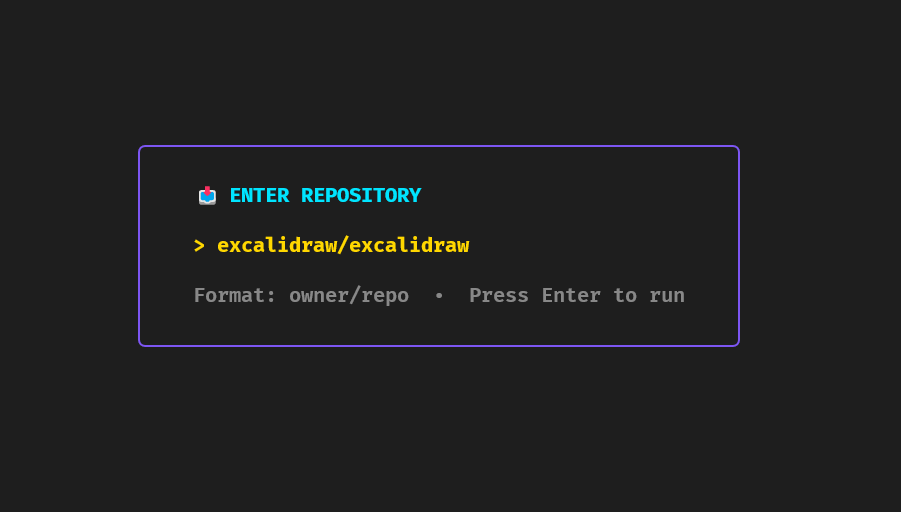
repo-lyzer analyze golang/go
Compare Repositories
Available via interactive menu.
Export Results
Export to JSON or Markdown from dashboard.
Interactive CLI Menu
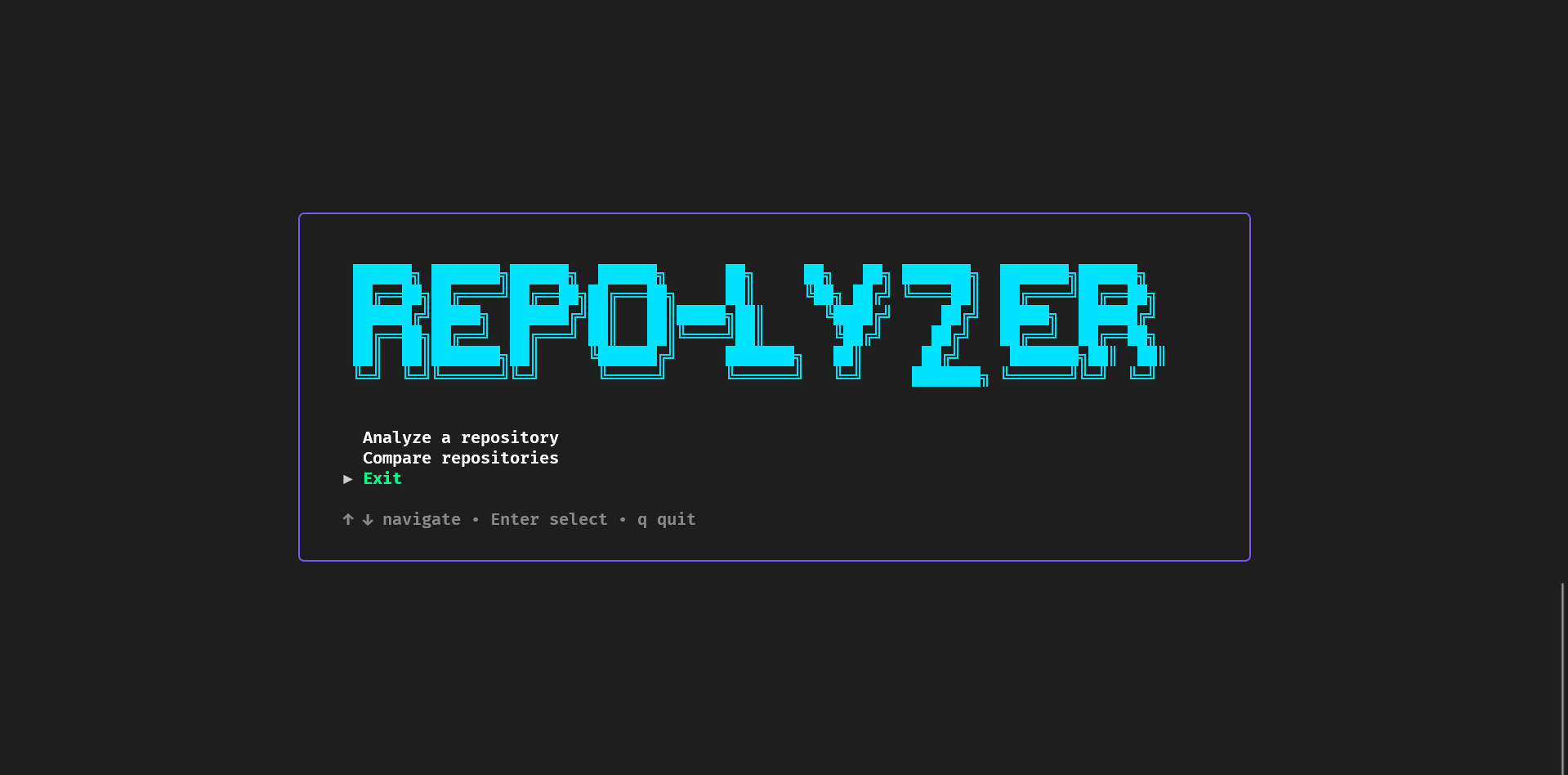
Repo-lyzer features a hierarchical, keyboard-driven menu system for easy navigation and access to all features.
Main Menu Options
- 📊 Analyze Repository – Enter analysis submenu to choose analysis type
- 🔄 Compare Repositories – Start side-by-side repository comparison
- 📜 View History – Browse previously analyzed repositories
- ⚙️ Settings – Access settings submenu for configuration
- ❓ Help – Open help submenu for guidance
- 🚪 Exit – Quit the application
Submenus
Analysis Types (accessed via 📊 Analyze Repository):
- ⚡ Quick Analysis – Fast overview with key metrics
- 🔍 Detailed Analysis – Comprehensive analysis with all metrics
- ⚙️ Custom Analysis – User-configurable analysis options
Settings (accessed via ⚙️ Settings):
- Theme Settings – Customize UI themes and colors
- Export Options – Configure default export formats
- GitHub Token – Set personal access token for higher rate limits
- Reset to Defaults – Restore all settings to default values
Help (accessed via ❓ Help):
- Keyboard Shortcuts – View all available shortcuts
- Getting Started – Quick start guide
- Features Guide – Detailed feature explanations
- Troubleshooting – Common issues and solutions
Navigation
- Arrow Keys (↑/↓) – Navigate menu options
- Enter – Select option or enter submenu
- ESC – Return to previous menu level
- Tab – Quick navigation between sections
Installation (For Users)
go install github.com/agnivo988/Repo-lyzer@v1.0.6
repo-lyzer
License
MIT License © 2026 Agniva Mukherjee yaml Copy code